OpenStack iLO Secure Boot

I just noticed that the OpenStack project has an alternative to UEFI Secure Boot, for iLO drivers:

Some of the Ironic deploy drivers support UEFI boot. It would be useful to security sensitive users to deploy more securely using Secure Boot feature of the UEFI. This spec proposes alternatives to support Secure Boot in baremetal provisioning for iLO drivers. […]

https://specs.openstack.org/openstack/ironic-specs/specs/kilo-implemented/uefi-secure-boot.html

https://blueprints.launchpad.net/ironic/+spec/uefi-secure-boot

Intel MPX support for Microsoft Visual Studio 2015

From the Microsoft Visual Studio blog, there’s a new post mentioning that VS2015.update1 has a new “Experimental” support of Microsoft MPX (Memory Protection Extensions).

This post is about Intel® Memory Protection Extensions (Intel MPX) support in Microsoft Visual Studio* 2015; content provided by Gautham Beeraka, George Kuan, and Juan Rodriguez from Intel Corporation. Update 1 for Visual Studio 2015 was announced on November 30, 2015. This update includes experimental compiler and debugger support for Intel MPX.  Intel MPX can check all pointer reads and writes to ensure they remain within their declared memory bounds.  This technology can detect buffer overflows and stop program execution at runtime, averting possible system compromises. It enables C/C++ code to make use of the new MPX instruction set and registers introduced in the 6th Generation Intel® Core™ Processors (“MPX-enabled platform”). The Microsoft Visual C++ Compiler* and linker can now generate checks automatically, a capability enabled by specifying a command line option. This blog explains how you can use automatic MPX code generation and debug MPX-enabled binaries.  For more details on Intel MPX, please see the Intel MPX Technology web page. […]

http://blogs.msdn.com/b/vcblog/archive/2016/01/20/visual-studio-2015-update-1-new-experimental-feature-mpx.aspx

Consumer Intel Android-IA devices: undefendable firmware??

Intel makes LUV, Linux UEFI Validation, to test Intel UEFI systems’s implementations. Intel also makes CHIPSEC, to test Intel x86/x64 BIOS/UEFI implementations for security issues, a firmware vulnerability management tool. Intel also makes Android-IA, the Intel fork of Android. It only boots via UEFI.

However, you apparently cannot use the Intel UEFI diagnostics (eg, LUV, CHIPSEC) to test Intel Android-IA systems. You can’t boot into LUV, and CHIPSEC doesn’t target Android. From a thread on the Android-IA mailing list on 01.org, on the topic of diagnosing a Baytrail-based Android-IA tablet, Christopher Price of Console OS mentions:

Production Intel Android devices do run UEFI, but it is for the most part today locked down. The only UEFI loader accepted triggers Android fastboot, which is baked into the UEFI payload. Secure Boot is on, basically – with no way to turn it off. Unfortunately, this cannot be unlocked today, as production Android devices do not respect the fastboot oem unlock command… aside from IRDA devices like the Trekstor tablet. Even IRDA does not have a UEFI config menu for the most part – it’s very locked down and meant to only run the UEFI apps related to fastboot and firmware updates. […]

And, as I understand it, Trekstor tablet is the only consumer device which permits users to configure things.

Full message:
https://lists.01.org/pipermail/android-ia/2016-January/001135.html
https://01.org/android-IA
https://github.com/android-ia

How do you test a device if can’t boot a clean OS to do diagnostics? With Secure Boot, it seems that they’ve forgotten that NIST permits owners to control their system locally, and make firmware and OS levels unmodifyable. OEMs can use their unlocked prototype boards to test security, but consumers have no option to test their device for security, in the name of boot lockdown security, with no way for user to configure.

How do sysadmins defend IoT things that you can’t run the only firmware security tools on them? Are Android-IA devices — except for some Trekstor tablets apparently — examples of the ‘undefendable’ subset of the IoT? How can an enterprise have a security policy to defend undefendable devices?? Do IoT vendors think about sysadmins, or just developers? How do I perform all of the recommended steps in the NIST SP-147 secure BIOS platform lifecycle, on IoT devices like this?

The firmware level of IoT devices are obscured by overloading firmware to mean all software on an embedded device, firmware security is a synonym for OS security or App security for embedded devices. 😦

With Microsoft hinting that Secure Boot will soon no longer be configurable, this seems like it’ll just get worse.

This issue impacts all architectures’s IoT devices, not just Intel Android-IA-based, UEFI-based devices.

If I had a Twitter account, I’d be spending half of my time online forwarding posts to the Internet of Shit account, sigh. 😦

STOKE: x64 assembler optimizer

https://github.com/StanfordPL/stoke-release

https://news.ycombinator.com/item?id=10924155

STOKE is a stochastic optimizer for the x86_64 instruction set. STOKE uses random search to explore the extremely high-dimensional space of all possible program transformations. Although any one random transformation is unlikely to produce a code sequence that is both correct and an improvement over the original, the repeated application of millions of transformations is sufficient to produce novel and non-obvious code sequences that have been shown to outperform the code produced by general-purpose and domain-specific compilers, and in some cases expert hand-written code.

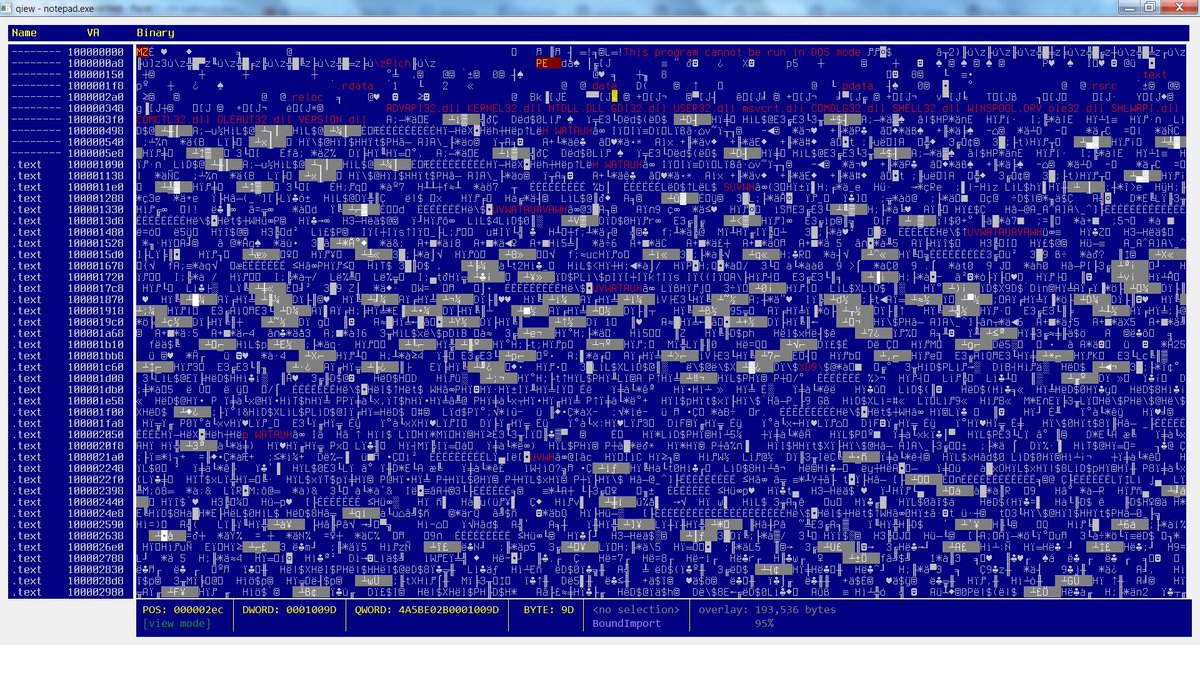
Qiew, Qt version of Hiew

https://github.com/mtivadar/qiew

Qiew – Hex/File format viewer
Portable Executable (PE) file viewer
Designed to be useful for reverse engineering malware.
features:
    highlights strings/calls/mz-pe very useful in malware analysis.
    PE info, able to jump to sections, entry point, overlay, etc.
    disassembler + referenced strings, API calls
    “highlight all” for current text selection.


Intel Memory Protection Extensions (MPX) documentation available

https://twitter.com/intelswfeed/status/689591155516923904

https://software.intel.com/en-us/articles/intel-memory-protection-extensions-enabling-guide

Intel® Memory Protection Extensions Enabling Guide

This document describes Intel® Memory Protection Extensions (Intel® MPX), its motivation, and programming model. It also describes the enabling requirements and the current status of enabling in the supported OSs: Linux* and Windows* and compilers: Intel® C++ Compiler, GCC, and Visual C++*. Finally, the paper describes how ISVs can incrementally enable bounds checking in their Intel MPX applications.

Apple security updates for iOS and OSX

Apple has released security updates for iOS, OS X El Capitan, and Safari to address multiple vulnerabilities. Exploitation of some of these vulnerabilities may allow a remote attacker to take control of an affected system.

https://www.us-cert.gov/ncas/current-activity/2016/01/19/Apple-Releases-Security-Updates-iOS-OS-X-El-Capitan-and-Safari

https://support.apple.com/en-us/HT205732

https://support.apple.com/en-us/HT205731


new Linux/Android kernel vulnerability

Linux Kernel Vulnerability: US-CERT is aware of a Linux kernel vulnerability affecting Linux PCs and servers and Android-based devices. Exploitation of this vulnerability may allow an attacker to take control of an affected system. US-CERT recommends that users and administrators review the Redhat Security Blog  and the Debian Security Bug Tracker for additional details and refer to their Linux or Unix-based OS vendors for appropriate patches.

https://www.us-cert.gov/ncas/current-activity/2016/01/19/Linux-Kernel-Vulnerability

https://access.redhat.com/security/cve/CVE-2016-0728

https://security-tracker.debian.org/tracker/CVE-2016-0728

security fix for Intel Driver Update Utility

The Intel Driver Update Utility (IDUU) was recently updated.

This update to the Intel® Driver Update Utility mitigates the use of a non-SSL URL. Intel has released a new version of the software that provides mitigation of this issue. Intel(R) Driver Update Utility analyzes Intel-product drivers on your computer and lets you know if driver updates are available. The utility can be used to download and install selected driver updates on your computer. This update to the Intel® Driver Update Utility helps mitigate the use of a non-SSL URL. Intel has released a new version of the software that provides mitigation of this issue. Intel highly recommends that customers of the affected product obtain and apply the updated version of the Software. Intel would like to thank Core Security for reporting this issue and working with us towards a disclosure timeline.

https://security-center.intel.com/advisory.aspx?intelid=INTEL-SA-00048&languageid=en-fr
https://security-center.intel.com/SearchResults.aspx
https://www-ssl.intel.com/content/www/us/en/support/detect.html
https://downloadmirror.intel.com/24345/a08/Intel%20Driver%20Update%20Utility%20Installer.exe
https://www-ssl.intel.com/content/www/us/en/support/topics/iduu-faqs.html

This tool is available for Windows, no other OS, see the above FAQ for more details.

Intel Authenticate: hardware-based 3-factor identity system

Intel announced a new chip today, and it includes a new Intel feature called Intel Authenticate, which appears to currently only support Microsoft Windows, no other OS. Excerpt from press release is below:

http://www.intel.com/content/www/us/en/architecture-and-technology/authenticate/intel-authenticate-is-hardware-enhanced-security.html

https://twitter.com/IntelSSD/status/689557113488613377

https://communities.intel.com/community/itpeernetwork/blog/2016/01/19/workplace-transforms-with-6th-gen-core-vpro

http://newsroom.intel.com/community/intel_newsroom/blog/2016/01/19/intel-transforms-the-workplace-with-latest-6th-generation-intel-core-vpro-processors

Locking the PC’s Virtual Front Door with More than Password Protection

Hackers are finding new ways to break into old PCs through the virtual front door by stealing user credentials to gain privileges inside organizations. Today, more than half of data breaches start with misused or stolen user credentials5. Older PCs that use eight-character passwords that change every 90 days worked well a decade ago, but increasingly sophisticated attack methods require a deeper level of security. To address this, Intel is previewing a new security innovation called Intel Authenticate for businesses to begin internally testing and qualifying. Intel Authenticate is a hardware-enhanced, multifactor authentication solution that strengthens identity protection on the PC, making it less vulnerable2 to identity and security credential attacks. Intel Authenticate verifies identities by using a combination of up to three hardened factors at the same time: “something you know,” such as a personal identification number; “something you have,” including a mobile phone; and “something you are,” like a fingerprint. IT can choose from multiple hardened factors of authentication that are based on company policies, and no longer has to rely solely on employees remembering complicated passwords2. Intel Authenticate is compatible with Microsoft Windows* 7, 8 and 10, and is available for customers to preview.

X-Ray, Duo Labs Android vulnerability tool

https://twitter.com/jonoberheide/status/689526256388476928

Duo has a new article on Android security out. The article mentions an Android vulnerability detection tool that Duo Labs has:

Another tool that can help users detect for known Android vulnerabilities is X-Ray, a Duo Labs tool that anyone can download and run on their Android-based phone and/or tablet. Now in version 2.0, this app safely scans for vulnerabilities and allows you to assess your current mobile security risk.


https://duo.com/blog/duo-analytics-android-device-security-article

https://labs.duosecurity.com/xray

SwiftOnSecurity on Windows/UEFI security

http://decentsecurity.com/#/securing-your-computer/

There’s a new guide to securing Windows systems. I enjoyed it because step 2 of the steps are firmware-centric, excerpted below, view the original doc, the excerpted formatting is a bit mangled, sorry.

I wish the advice mentioned using CHIPSEC to do security tests to see if system came from OEM with unfixable security flaws, and to use CHIPSEC or other tools — perhaps via LUV-live or directly — to save  a NIST SP-147-style ‘golden image’ of your ROM, doing periodic offline/forensic examination of your ROM images with CHIPSEC, UEFI Firmware Parser, and other tools. (I have no input as to the non-firmware Windows-centric input in the list.)

1.) Update BIOS
For best compatibility and security you should update your computer’s BIOS. A modern BIOS (really UEFI) is a full operating system that runs below and at the same time as Windows, and it needs patches too. People who built computers in the early 2000’s will tell you BIOS updates are risky, and they were, but not anymore. They deliver fixes, features, and security updates you won’t hear about on the news. Even new computers/motherboards need updates. If you’re starting from scratch, do the BIOS update after installing Windows 10. You can find the BIOS update tool on your manufacturer’s driver page for your computer model. You will need to reboot for it to take effect. If you have a Surface, BIOS updates are delivered through Windows Update.

3.) Configure BIOS
This is important and is something nobody talks about. From the boot of your computer, press the setup hotkey. It may be F1, F2, F8, F10, Del, or something else to get into SETUP mode. In the BIOS: Set a setup password. Make it simple, this is only to prevent malicious modification by someone in front of the computer or by a program trying to corrupt it. Change boot to/prioritize UEFI. Disable everything except UEFI DVD, UEFI HDD, and USB UEFI if you plan on using a USB stick to install Windows. Enable the TPM (if available) and SecureBoot (if available) options. This is super important. Disable 1394 (FireWire) and ExpressCard/PCMCIA (if you’re on a laptop) as a layer to further mitigate DMA attacks. This isn’t as important anymore, but if you don’t use them you might as well turn it off. If you want, and if the computer offers it, you can enable a System and HDD password. We will be using BitLocker to protect the disk, but this is an extra layer you can add if you want. I don’t. If you don’t use webcam or microphone, you may be able to turn them off in the BIOS. Save settings and shut down.

The Linux Foundation has some UEFI-centric, Linux-centric desktop advice, which has some overlaps in security methods to the above UEFI-centric, Windows-centric desktop advice:

Linux Foundation IT Security Policies: firmware guidance

The Crypto Party Handbook also has some related advice, for security/privacy-minded use. The Secure Desktop mailing list is the center of the universe for this, where the handful of Linux distributions that focus on secure/privacy as their main features, hang out. If you care about a secure OS, you should be using one of theirs, not an OS where security is not their primary concern.

https://github.com/cryptoparty/handbook

https://secure-os.org/pipermail/desktops/2015-October/000000.html
https://secure-os.org/desktops/charter/

[I need to find some similar security hardening checklist for ChomeOS-based, coreboot-based systems, instead of Windows-based UEFI/BIOS-based systems,  talking about ensuring TPM on x86/x64, using coreboot with Verified Boot, specifics on how to best adopt those keys, like how Nikolaj shows us how to adopt UEFI Secure Boot keys, and others show how to use MOK. Any tips appreciated, please leave a Comment (see left) or send email (see above right). Thanks.]

MacDBG: new Mac OS X debugger

Tyler Bohan has released a new debugging tool for Mac OS X, including a Capstone-based dissassembler:

Excerpt from readme:

Mac Debugger is simple easy to use C and python debugging framework for OSX. Mac Debugger was created with the focus on giving the programmer a powerful framework to programatically create scripts to debug programs on Mac OSX not found in other products for the platform. The core of macdbg, written in C, is kept as minimal as possible to provide enough basic interaction between the kernel and userland to create powerful features. Higher level functionality is left to the Python implementation such as stack tracing, dissasembly, watchpoints, thread state, and more. A wrapper class is provided for the programmer to create a scripting program. […]

https://github.com/blankwall/MacDBG

SGX-pwenclave: password hardening using Intel SGX enclaves

Joe Birr-Pixton has an interesting new blog post — with source code — on using Intel SGX in enclaves to help with creating strong passwords:

Using SGX to harden password hashing: SGX is a way of running security-sensitive user-mode code in an ‘enclave’. Code running in an enclave has its memory encrypted and authenticated, and cannot be observed by code running anywhere else. It’s able to use device-specific keys to encrypt (‘seal’) data to future executions of itself or enclaves signed by the same key. We can use SGX to harden password hashing, by imposing the restriction that it is only possible on our hardware. That means offline attack is no longer possible, and a database leak only contains undecryptable ciphertext. […]

Full post:

https://jbp.io/2016/01/17/using-sgx-to-hash-passwords/
https://github.com/ctz/sgx-pwenclave

Wikipedia’s BIOS security roadmap

You’d think that with a blog called ‘firmware security’, I’d know about the ‘Wikipedia BIOS feature comparison’ page. But I did not, sad. 😦  The other day I was wishing someone would create a comparision of BIOS implementations and their security features. Luckily, Kevin O’Conner of the SeaBIOS project was kind enough to point this out to me, when I was looking for a SeaBIOS security roadmap:

https://en.wikipedia.org/wiki/BIOS_features_comparison

I’ve been learning more about SeaBIOS, and am impressed with it’s features. I wonder why some Linux OEMs still ship closed-source BIOS systems from IBVs? Given their audience demographic, you’d think they’d be using Linux-based coreboot, and on x86/x64 systems using SeaBIOS. They could be using coreboot Verified Boot + SeaBIOS’s TPM support for a much more secure than they are today. If you’re buying a System76 or ThinkPenguin or other Linux-centric site, ask them what firmware solution they’re giving you.

FreeBSD gets EFI ZFS boot support

https://twitter.com/lattera/status/687827182933164033
https://twitter.com/lattera/status/687938571567783936

https://forums.freebsd.org/threads/freebsd-zfs-on-uefi-support-just-landed.54744/

https://svnweb.freebsd.org/base?view=revision&revision=294068

Add EFI ZFS boot support: This builds on the modular EFI loader support added r294060 adding a module to provide ZFS boot support on EFI systems. It should be noted that EFI uses a fixed size memory block for all allocations performed by the loader so it may be necessary to tune this size. For example when building an image which uses mfs_root e.g. mfsbsd, adding the following to /etc/make.conf would be needed to prevent EFI from running out of memory when loading the mfs_root image.
EFI_STAGING_SIZE=128


Intel Security white paper on hardware/firmware threat predictions

McAfee Labs
2016 Threats Predictions
Intel Security: A five-year look ahead
http://www.mcafee.com/us/mcafee-labs.aspx

Twenty-one thought leaders from Intel Security collaborated to produce this look ahead at how the cybersecurity marketplace and actors are likely to evolve. […]

There are two sections in the document that focus on hardware/fimware security, search for the “Security on Silicon” and “Hardware” sections. A few brief experts:

We currently see only miniscule amounts of malware that target hardware or firmware vulnerabilities, but that is going to change during the next five years. We expect to see many groups leveraging newly discovered techniques, sharing what they know as they try to build effective attacks. Much of this will trickle down, from advanced nation-state intelligence and defense agencies, through big organized crime syndicates, and into broader use. Hardware and firmware protections such as secure boot, trusted execution environments, tamper protection, cryptographic acceleration, active memory protection, and immutable device identity make it more difficult for these attacks to gain a foothold, as well as easier to detect and correct them.

System firmware-based attacks pose a critical risk when coupled with the cloud or with cloud service providers. In 2015, the Intel ATR team demonstrated how to gain access to adjacent virtual machines through multiple vectors, including firmware rootkits or simple misconfigurations. Threats similar to the S3 Boot Script attack can be adapted for in-the-wild attacks. In many cases, it is just a matter of exploiting simple misconfigurations in UEFI or BIOS.

Going forward, we must be hyperaware of the system components below the operation system and how those components can be exploited or leveraged for attack. Available controls for under the operating system attacks include tools like CHIPSEC, and technologies like Intel’s Kernel Guard Technology (iKGT) and Intel BIOS Guard.

I wish that last paragraph mentioned ITL’s Stateless Laptop as one of the solutions.

Hmm, Why are there only BIOS and UEFI attacks mentioned? Where are the coreboot and U-Boot attacks? Are all listed firmware attacks against legacy BIOS systems and UEFI systems, not coreboot or U-Boot attacks? Intel spends resources on both UEFI as well as coreboot, so it seems strange to only see UEFI mentioned in their security. U-Boot also supports Intel these days, apparently without Intel’s involvement. So I’d hope to see a bit of coverage of both coreboot and prehaps a bit of U-Boot.

Is this because firmware attacks are being focused on Windows systems, not Chrome systems, due to marketshare numbers or expertise of attackers/researchers? I recall seeing some news recently claiming that Chrome PCs now outnumber Windows PCs.

Maybe because CHIPSEC only only targets Intel x86/x64 BIOS/UEFI systems, not coreboot/U-Boot systems, or ChromeOS systems, or ARM/AMD/MIPS/Itanium/other architectures, and if CHIPSEC is the only modern firmware vulnerability analysis tool, then lack of tools keeps these other systems’ security profiles dark? Why is AMD not porting CHIPSEC to AMD64, as well as the other handful of x86-compatible vendors?

Why is ARM not porting CHIPSEC to AArch32, only AArch64, and what is status of port, it was mentioned months ago but no status on final port. Once CHIPSEC’s C/asm/Perl userland and C/asm kernel HAL are ported to new arch, and Intel-centric stuff is ifdef’ed out, CHIPSEC still needs new chip-centric security tests added, and I don’t see anyone from ARM/Linaro doing this, so their port will be a gutted empty CHISPEC, not useful without new tests. Where is the ARM report mentioning the lack of CHIPSEC is a huge issue to enterprises ability to protect ARM systems?

Maybe ChromeOS + coreboot’s Verified Boot results in more secure systems than UEFI? Windows systems are UEFI and optional closed-source IBV-based BIOS, if Legacy Mode present. Chrome systems are coreboot and open-source SeaBIOS-based BIOS.

I’m glad Intel provides this kind of white papers. I wish AMD and ARM and other architecture vendors would also offer similar reports. I really wish there was some research on this from a neutral vendor, not a not a chip vendor, so we could see balanced coverage of Intel, AMD, ARM, OpenPOWER, and other systems, and their firmware, covered, including peripheral security (PCIe, NVMe, Thunderbolt, USB, etc. Doesn’t NIST have a hardware/firmware group? I wish they generated a HW/FW periodic security report. It could have the perspective to scope discussion to include trusting closed-source blobs, resident -vs- nonresident firmware solutions and their attack vectors, comparison’s of silicon and firmware (eg, Verified -vs- Secure boot) solutions, and most importantly not just solutions from a single vendor.