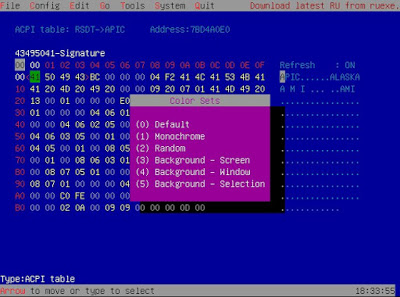
RU 5.20.0328 beta released

RU is closed-source freeware for MS-DOS and UEFI. Some UI changes and bugfixes. Changes include:

* Add PCI Express Capabilities Register.bit8 Slot implemented information to info block
* Fix device name was not cleared while changing PCI device
* F6 PCI list changes (PCI Express) to PCIe
* RU /D ACPI: Display the saving file information more clearly
* ALT-6 ACPI table list now list OEM ID, OEM Table ID and Creator ID.
* Fix wrong ACPI table checksum bad information if the length > 0xffff

Important notes: Every version of RU has it own bugs simply because I did not test it fully. Please leave comments here if you find any bug. RU.EXE are not tested at all.

Password: 174105371023

http://ruexe.blogspot.com/2017/12/ru-5200328-beta.html

https://github.com/JamesAmiTw/ru-uefi/

UEFI BIOS Updater (UBU) updated

I wish I could tell you the official home page of UEFI BIOS Updater (UBU), but I am not sure where it is. Decades ago, I used to trust some freeware, but these years I am more hesitant. I wish UBU was open source. 😦

http://www.win-raid.com/t154f16-Tool-Guide-News-quot-UEFI-BIOS-Updater-quot-UBU.html

https://twitter.com/freewareactive/status/769501789280501760

https://twitter.com/freewareactive/status/769523790460100608

UBU 1.43 released

UBU 1.43 released

UEFI BIOS Updater (UBU) 1.43 has been released, according to multiple news sources:

https://twitter.com/freewareactive/status/670077533774311425

http://www.majorgeeks.com/files/details/uefi_bios_updater.html

http://www.softpedia.com/get/System/System-Miscellaneous/UEFI-BIOS-Updater.shtml

http://www.win-raid.com/t154f16-Tool-Guide-News-quot-UEFI-BIOS-Updater-quot-UBU.html

This is not an open source tool. It is closed-source freeware, which works on Microsoft Windows systems. I’ve not used this, but I’ve heard of others who use and recommend it. If you are going to use it, please read all the documentation first, there are many caveats and warnings.

tool mini-review: RWEverything

RW, aka RWEverything (Read and Write Everything) is a GUI Windows-based firmware utility, written by Jeff.

“This utility access almost all the computer hardware, including PCI (PCI Express), PCI Index/Data, Memory, Memory Index/Data, I/O Space, I/O Index/Data, Super I/O, Clock Generator, DIMM SPD, SMBus Device, CPU MSR Registers, ATA/ATAPI Identify Data, Disk Read Write, ACPI Tables Dump (include AML decode), Embedded Controller, USB Information, SMBIOS Structures, PCI Option ROMs, MP Configuration Table, E820, EDID and Remote Access. And also a Command Window is provided to access hardware manually. Powerful utility for hardware engineers, firmware (BIOS) engineers, driver developers, QA engineers, performance test engineers, diagnostic engineers, etc.”

“This utility comes with ABSOLUTELY NO WARRANTY, it allows you to modify hardware settings, this may damage your system if something goes wrong. Author will not take any responsibility about that, you are on your own risk. This utility should not be used in commercial products.”

RW supports multiple Super I/O devices (Winbond (18), ITE (12), SMSC (8), FinTek (4), Nuvoton (6)) and SMBus Controllers (Intel (9), SiS (6), VIA (4), ULi (4), ATI (3), nVidia (13)).

It is Windows-centric utility, shipping with Win32 or Win64 binaries. It has an extensive ChangeLog, spanning v1.6.8 from 8/6/2015 to v0.1 back around 2005, but does not ship with any documentation, just EXEs. If you use Windows, you might want to check this out. If you find the tool useful, the author has a Donate button on his home page, please consider donating to the program’s author. I wish the tool was open source, and supported multiple operating systems, …but I’ll take what I can get. Thanks Jeff!

Home

Supported Hardware

Download

tool mini-review: Read Universal utility (RUEXE)

[Correction: the .EXE is for MS-DOS, not for Windows.]

Feedback from a very smart reader:

“The Read Universal utility is a Swiss-Army-Knife for BIOS debugging, the tools that provides direct access to almost all resources like memory, IO space, PCI, SMBIOS data, UEFI variables and so on. The tool is written by AMI’s UEFI engineer James Wang.”

James site say: “I wrote RU.EXE for debugging BIOS problems in 1993. It was a simple tool but it turns out to be too complex now. And yes, I am still working for a BIOS company.”

The release includes MS-DOS-based ru.exe and UEFI-based ru.efi binaries. AFAICT, there are no sources on Google Code, it looks like this is a closed-source freeware tool. The release page for each release includes a password. Read the blog for multiple articles that describe new features.
[I’m just learning about this tool, obviously. I’ve been using open source tools for so long that I’m a bit nervous about using closed-source freeware binaries, but recommendation is from someone smart, so I’m setting up a safe environment to learn to use this tool. 🙂 ]

http://ruexe.blogspot.de/
https://code.google.com/p/ru-uefi/