Intel ME File System Explorer
This repository contains Python 2.7 scripts for parsing MFS/MFSB partition and extracting contained files.

Hastily-written news/info on the firmware security/development communities, sorry for the typos.
Intel ME File System Explorer
This repository contains Python 2.7 scripts for parsing MFS/MFSB partition and extracting contained files.
This test suite helps you keep track of different versions of u-boot/build tools, static analysis of that build’s binaries, and runtime trace results of running that binary on a given hardware configuration. For each u-boot/build configuration it keeps a database of information it statically gathered for each boot stage, boot stage images/ELF files, a prepared SD card image, and test results of runtime trace analyses. If it detects changes in the u-boot source or build tools it will create a new set of test result directories with a new sdcard image and static analysis results.[…]
https://github.com/bx/bootloader_instrumentation_suite
See-also:
Simple-UEFI-Bootloader
A UEFI bootloader for bare-metal x86-64 applications. It’s like a much simpler version of GRUB, mainly meant for writing your own operating system-less 64-bit programs. Supports Windows, Linux, and Mac executable binaries (PE32+, 64-bit ELF, and 64-bit Mach-O formats). It also supports… Well, I’ll let you figure that one out yourself. ;)[…]
Exciting, another open source EBC tool!
ebc.asm: EFI Byte Code Assembler macroinstructions for fasmg assembly engine
Think twice about buying internet-connected devices off eBay
Mike Murphy
The holiday season is the perfect time to shell out for the latest and greatest smart-home and internet-connected gadgets, like game consoles, drones, smart lightbulbs and switches. But if you’re thinking about taking advantage of the deals that can be had buying from second-hand and auction sites like eBay, first consider the potential risks. When you’re buying from a third-party seller, it’s a lot more difficult to tell where products have come from, whether you’re getting exactly what you think you’re getting, and if anything has been done to the product since it was manufactured. “It is possible for internet-connected devices to be tampered with and resold on the web,” Leigh-Anne Galloway, lead cybersecurity resilience analyst at the cybersecurity firm Positive Technologies, told Quartz. “It’s similar to buying a secondhand cellphone without it being restored to factory settings.”[…]
Related: https://firmwaresecurity.com/2016/09/07/us-cert-on-validation-of-grey-market-hardware/
Protect Your IoT Designs from Malware
Rudy Ramos, Mouser Electronics
12/18/2017 08:00 AM EST
Recent malware attacks such as BrickerBot are a call to action to improve security in products designed for the Internet of Things.[…]
* Provide software patches as new vulnerabilities are discovered
* Provide routine automatic software updates
* Designate a point of contact if a security issue occurs
* Implement encryption for updates
[…]
https://www.eetimes.com/author.asp?section_id=36&doc_id=1332744
Re: https://firmwaresecurity.com/2016/08/28/peibackdoor-new-uefi-payloadbackdoor-tool/
N0where.net has a new story showing how to use this backdoor, and various Twitter news sites are also covering this. 🙂
https://github.com/Cr4sh/PeiBackdoor
https://twitter.com/Hackers_toolbox/status/941957029878468608
https://n0where.net/pei-stage-backdoor-for-uefi-compatible-firmware-peibackdoor/
BTW, the blog site for Dmytro has been down for a few days. A few months ago, it was down for about a week. Hopefully it’ll come back again.
http://blog.cr4.sh/
RU is closed-source freeware for MS-DOS and UEFI. Some UI changes and bugfixes. Changes include:
* Add PCI Express Capabilities Register.bit8 Slot implemented information to info block
* Fix device name was not cleared while changing PCI device
* F6 PCI list changes (PCI Express) to PCIe
* RU /D ACPI: Display the saving file information more clearly
* ALT-6 ACPI table list now list OEM ID, OEM Table ID and Creator ID.
* Fix wrong ACPI table checksum bad information if the length > 0xffff
Important notes: Every version of RU has it own bugs simply because I did not test it fully. Please leave comments here if you find any bug. RU.EXE are not tested at all.
Password: 174105371023
http://ruexe.blogspot.com/2017/12/ru-5200328-beta.html
https://github.com/JamesAmiTw/ru-uefi/
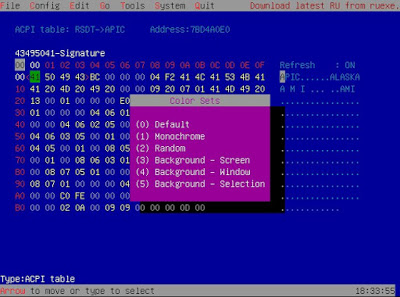
For UEFI Shell uers, there is another ACPI diagnostic tool, in addition to CHIPSEC and acpidump. Excerpts of edk2-devel mailing list post and tool manpage below, see full list posting for source code and more info.
ShellPkg: Add acpiview tool to dump ACPI tables
This program is provided to allow examination of ACPI table contents from the UEFI Shell. This can help with investigations, especially at that stage where the tables are not enabling an OS to boot. The program is not exhaustive, and only encapsulates detailed knowledge of a limited number of table types. Default behaviour is to display the content of all tables installed. ‘Known’ table types will be parsed and displayed with descriptions and field values. Where appropriate a degree of consistency checking is done and errors may be reported in the output. Other table types will be displayed as an array of Hexadecimal bytes. To facilitate debugging, the -t and -b options can be used to generate a binary file image of a table that can be copied elsewhere for investigation using tools such as those provided by acpica.org. This is especially relevant for AML type tables like DSDT and SSDT. The inspiration for this is the existing smbiosview Debug1 Shell command. Many tables are not explicitly handled, in part because no examples are available for our testing. The program is designed to be extended to new tables with minimal effort, and contributions are invited.
acpiview
Display ACPI Table information.
ACPIVIEW [[-?] | [[-l] | [-s AcpiTable [-d]]] [-c] [-v] [-h Highlight]]
-l – Display list of installed ACPI Tables.
-s – Display only the specified AcpiTable type.
AcpiTable : The required ACPI Table type.
-d – Generate a binary file dump of the specified AcpiTable.
-c – Consistency checking (enabled by default).
-v – Display verbose data (enabled by default).
-h – Enable/Disable Colour Highlighting.
Highlight : TRUE/ON enables highlighting;
FALSE/OFF (default) disables highlighting.
-? – Show help.
Formatted display and checking is provided for these signature types:
APIC – Multiple APIC Description Table (MADT)
BGRT – Boot Graphics Resource Table
DBG2 – Debug Port Table 2
FACP – Fixed ACPI Description Table (FADT)
GTDT – Generic Timer Description Table
IORT – IO Remapping Table
MCFG – Memory Mapped Config Space Base Address Description Table
RSDP – Root System Description Pointer
SLIT – System Locality Information Table
SPCR – Serial Port Console Redirection Table
SRAT – System Resource Affinity Table
XSDT – Extended System Description Table
EXAMPLES:
To display a list of the installed table types:
fs0:\> acpiview -l
To parse and display a specific table type:
fs0:\> acpiview -s GTDT
To save a binary dump of the contents of a table to a file in the current working directory:
fs0:\> acpiview -s DSDT -d
To display contents of all ACPI tables:
fs0:\> acpiview
Interesting, Pepijn Bruienne is looking at new Apple firmware, and how it uses Intel ME.
64-bit Tiano Core UEFI for the Raspberry Pi 3
Last updated December 14th, 2017.
This is an implementation of a 64-bit UEFI firmware for the RPi3 platform, based off Ard Bisheuvel’s 64-bit http://www.workofard.com/2017/02/uefi-on-the-pi/ and Microsoft’s 32-bit https://github.com/ms-iot/RPi-UEFI/tree/ms-iot/Pi3BoardPkg. Initially, this was supposed to be an easy walk in the park, where the Microsoft drivers just sorta slide into Ard’s UEFI implementation, and I call it a day. It turned out to be a bit more frustrating of an experience than that :-). This is meant as a generally useful 64-bit UEFI implementation for the Pi3, good enough for most kinds of UEFI development and good enough for running real operating systems. It has been validated to install and boot Linux and FreeBSD.[…]
This document describes the memory encryption support targeting future Intel processors. Note that Intel platforms supports many different types of memory and not all SOC would support this capability for all types of memory. Initial implementation is likely to focus on traditional DRAM and NVRAM.
Total Memory Encryption (TME) – as name would imply is a capability to encrypt entirety of physical memory of a system. This capability is typically enabled in very early stages of boot process with small change to BIOS and once configured and locked will encrypt all the data on external memory buses of an SOC using NIST standard AES-XTS algorithm with 128-bit keys. The encryption key used for TME uses hardware random number generator implemented in Intel SOC and the keys are not accessible by software or using external interfaces to Intel SOC. TME capability is intended to provide protections of AES-XTS to external memory buses and DIMMs. The architecture is flexible and will support additional memory protections schemes in future. This capability when enabled is intended to support (unmodified) existing system and application software. Overall performance impact of this capability is likely to be relatively small and is highly dependent on workload.
Multi-Key Total Memory Encryption (MKTME) builds on TME and adds support for multiple encryption keys. The SOC implementation will support a fixed number of encryption keys, and software can configure SOC to use a subset of available keys. Software manages the use of keys and can use each of the available key for encrypting any page of the memory. Thus, MKTME allows page granular encryption of memory. By default MKTME uses TME encryption key unless explicitly specified by software. In addition to supporting CPU generated ephemeral key (not accessible by software or using external interfaces to SOC), MKTME also supports software provided keys. Software provided keys are particularly useful when used with non-volatile memory or when combined with attestation mechanisms and/or used with key provisioning services. In virtualization scenario, we anticipate VMM or hypervisor to manage use of keys to transparently support legacy operating systems without any changes (thus, MKTME can also be viewed as TME virtualization in such deployment scenario). An OS may be enabled to take additional advantage of MKTME capability both in native or virtualized environment. When properly enabled, MKTME is available to each guest OS in virtualized environment, and guest OS can take advantage of MKTME in same was as native OS.
Click to access Multi-Key-Total-Memory-Encryption-Spec.pdf
BTW, this is a great Twitter account to watch for updates to the Intel documentation.
Re: https://firmwaresecurity.com/2017/12/13/apple-secure-boot/
A New Level of Integration and Security
iMac Pro brings a new level of integration and security to the Mac with the T2 chip, Apple’s second generation custom Mac silicon. By designing and integrating several new controllers — such as the System Management Controller, image signal processor, audio controller and SSD controller — T2 delivers new capabilities to the Mac like enhanced imaging processing for the FaceTime HD camera. T2 also enables a new level of security by including a secure enclave coprocessor that provides the foundation for new encrypted storage and secure boot capabilities. Dedicated AES hardware encrypts data on the SSD without affecting performance, while secure boot ensures that only trusted software loads at startup.
https://www.apple.com/newsroom/2017/12/imac-pro-the-most-powerful-mac-ever-available-today/
I wish there was some firmware information in the tech specs:
https://www.apple.com/imac-pro/specs/
Command line UEFI bootnext tool for windows,
Start without parameters for interactive mode or use the following syntax:
Command line usage: efiboot [<boot item name>|<boot item number>[!]]
Example: efiboot ubuntu!
Example: efiboot “Windows Boot Manager”
Example: efiboot 3!
! will restart the system after setting the boot next parameter
ERP 17.12 has been released!
The goal of the Linaro Enterprise Reference Platform is to provide a fully tested, end to end, documented, open source implementation for ARM based Enterprise servers. The Reference Platform includes kernel, a community supported userspace and additional relevant open source projects, and is validated against existing firmware releases. The Linaro Enterprise Reference Platform is built and tested on Linaro Enterprise Group members hardware and the Linaro Developer Cloud. It is intended to be a reference example for use as a foundation for members and partners for their products based on open source technologies. The members and partners to include distribution, hyperscaler or OEM/ODM vendors, can leverage the reference for ARM in the datacenter.
[…]
– Focused on ACPI and UEFI use-cases.
[…]
http://releases.linaro.org/reference-platform/enterprise/17.12/
https://platforms.linaro.org/documentation/Reference-Platform/Platforms/Enterprise/ReleaseNotes-17.12.md/
More info: linaro-announce@lists.linaro.org list archives:
https://lists.linaro.org/mailman/listinfo/linaro-announce
Mac Firmware Engineer
The Mac Platform Software team is looking for a firmware engineer to join a new Austin-based team responsible for developing Apple’s UEFI implementation and related technologies for the Mac product line. Mac Platform Software is responsible for bringing up macOS and Windows on all new Mac products, including the development and integration of firmware and systems software for macOS and Windows, the development of platform-level features for the Mac, and the leadership of cross-functional debug and optimization efforts across hardware and software teams. A Mac Firmware Engineer is responsible for the development of Apple’s UEFI implementation and its related technologies. UEFI provides the boot firmware for all Mac systems and plays a critical role in system stability, performance, and battery life. This role also contributes to development of the boot loader and firmware update mechanisms, as well as other related technologies. Primary job responsibilities include firmware feature development supporting new Mac software and hardware features, supporting ongoing efforts to improve the quality of shipped Macs in the field, and assisting the larger Mac Platform organization in cross-functional efforts to design and build new Mac products.
* Experience in firmware/BIOS development
* Experience with boot loaders and firmware/kernel interfaces
* Knowledge of UEFI and the x86 platform and standards, including ACPI, SMM, PnP, PCIe, and JEDEC DDR a plus
* Strong understanding of system power management a plus
https://jobs.apple.com/search?job=56183392&openJobId=56183392#&openJobId=56183392
Wow, the Apple firmware team keeps getting more and more amazing talent.
Some older reading on Rafal:
https://invisiblethingslab.com/itl/About.html
http://theinvisiblethings.blogspot.com/2008/07/rafal-wojtczuk-joins-invisible-things.html
https://blogs.bromium.com/author/rafalwojtczuk/
Hastily-written news/info on the firmware security/development communities, sorry for the typos.
Hastily-written news/info on the firmware security/development communities, sorry for the typos.
Hastily-written news/info on the firmware security/development communities, sorry for the typos.
Hastily-written news/info on the firmware security/development communities, sorry for the typos.
Hastily-written news/info on the firmware security/development communities, sorry for the typos.
Hastily-written news/info on the firmware security/development communities, sorry for the typos.
Hastily-written news/info on the firmware security/development communities, sorry for the typos.
Hastily-written news/info on the firmware security/development communities, sorry for the typos.
Hastily-written news/info on the firmware security/development communities, sorry for the typos.
Hastily-written news/info on the firmware security/development communities, sorry for the typos.
Hastily-written news/info on the firmware security/development communities, sorry for the typos.
Hastily-written news/info on the firmware security/development communities, sorry for the typos.
Hastily-written news/info on the firmware security/development communities, sorry for the typos.
Hastily-written news/info on the firmware security/development communities, sorry for the typos.
Hastily-written news/info on the firmware security/development communities, sorry for the typos.
Hastily-written news/info on the firmware security/development communities, sorry for the typos.
Hastily-written news/info on the firmware security/development communities, sorry for the typos.
Hastily-written news/info on the firmware security/development communities, sorry for the typos.
Discover the Desktop
Hastily-written news/info on the firmware security/development communities, sorry for the typos.
Hastily-written news/info on the firmware security/development communities, sorry for the typos.
Hastily-written news/info on the firmware security/development communities, sorry for the typos.
Hastily-written news/info on the firmware security/development communities, sorry for the typos.
Hastily-written news/info on the firmware security/development communities, sorry for the typos.
Hastily-written news/info on the firmware security/development communities, sorry for the typos.
Hastily-written news/info on the firmware security/development communities, sorry for the typos.
Hastily-written news/info on the firmware security/development communities, sorry for the typos.
Hastily-written news/info on the firmware security/development communities, sorry for the typos.
Hastily-written news/info on the firmware security/development communities, sorry for the typos.
Hastily-written news/info on the firmware security/development communities, sorry for the typos.
Hastily-written news/info on the firmware security/development communities, sorry for the typos.
Hastily-written news/info on the firmware security/development communities, sorry for the typos.
Hastily-written news/info on the firmware security/development communities, sorry for the typos.
Hastily-written news/info on the firmware security/development communities, sorry for the typos.
Hastily-written news/info on the firmware security/development communities, sorry for the typos.
Hastily-written news/info on the firmware security/development communities, sorry for the typos.
Hastily-written news/info on the firmware security/development communities, sorry for the typos.
News from coreboot world
Hastily-written news/info on the firmware security/development communities, sorry for the typos.
Hastily-written news/info on the firmware security/development communities, sorry for the typos.
Just another WordPress.com site
Hastily-written news/info on the firmware security/development communities, sorry for the typos.
 Firmware Security
You must be logged in to post a comment.